MIT App Developer Program

In order to survive in the 21st century, one needs to have an aptitude for technology and software. Interest in software development and application should be encouraged not only by schools but by students themselves. Even professionals in different fields of work, such as law, medicine, finance etc. could have a taste for software development but never got the chance to build on it. Luckily enough, the researchers at the Massachusetts Institute of Technology did not only recognise this but also took steps in order to meet the needs of school-going kids and counter the drawback faced by professionals.

The ‘MIT App Developer Program’ is a cloud-based tool, which means you can make apps right in your web-browser. It is a blocks-based programming tool that allows everyone to build a fully-functional android app in less than an hour. All one needs to get on the Developer bandwagon is a Google account and an android device to experiment with. This paraphernalia is easily available and is also economically viable. Connecting your device and getting started with the development of apps is not a hefty task, thanks to their clearly laid out instructions in the ‘Getting Started’ guide. 

This program was the brain child of Google's Mark Friedman and MIT professor Hal Abelson. It runs as a web service run by staff at the MIT Centre for Mobile Learning. It supports a worldwide community of 3 million users, and more than 100 thousand of its weekly users have built more than 7 million functional apps till date. 

Who uses this program?

This program has encapsulated the attention of a wide variety of people, ranging from formal and informal educators to government and civic employees; from researchers to hobbyists and entrepreneurs.

This Program has bridged the divide between ‘professionals’ and ‘novices’. Children at the age of 14 years can now make android apps without going into the intricacies of Java or PHP. People over the age of 60 with a penchant for programming can sit at home and indulge themselves. This app does not discriminate. 


Working:

The program works in two folds: first, the real time app simulator on your android device which can be downloaded from the Play Store and second, the MIT App Inventor 2 Beta version on your laptop/PC. 

The App inventor consists of the 'Design' and 'Blocks' pages which take care of the front end and back end execution of the apps under construction respectively. The aesthetic aspect of the apps is taken care of using the Design page, while each button or canvas on the design page is given its required functionality with the help of the blocks.
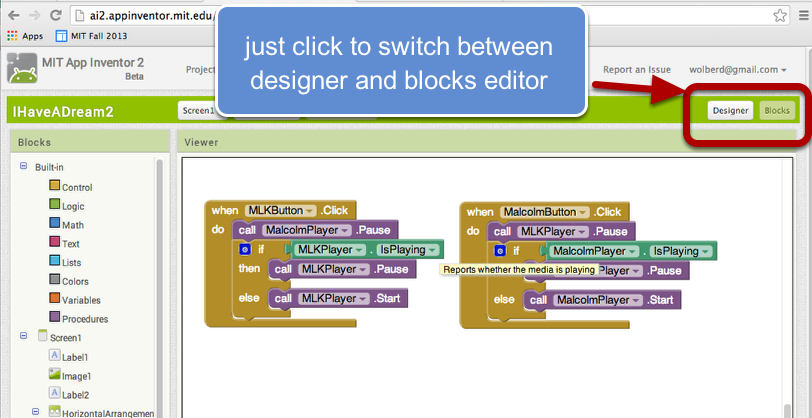

Without having to go into the nuances of Java or any other language, one can easily build functional apps and test them out in real time.

No other technical paraphernalia is required to connect your android device to the laptop. You just need to ensure that both of these are connected to the same WiFi network. How much easier can it really get?

Advantages:

Imagine building an android app at the age of 15 which makes your phone talk at the touch of a button, or bouncing a ball around on the phone screen with your finger. Achieving all this without going into detailed theory does not only boost one’s morale, but also does wonders to expand your horizons.

Venturing into the field of operative app development at a young age can only have a positive impact on one's intellectual growth. Backed by the expertise of Google and MIT, one can be sure that it won't lack in terms research, education and potential for further growth.

One can start building apps according to their own needs without having to depend on other professionals programmers. For instance, a lawyer may need an app which arranges his/her appointments based on certain exclusive requirements, which no other existing app provides. The lawyer can thus make his/her own app just the way he/she wants. 

The myriad of opportunities available to people these days should be exploited to the best of their potential and the skills enhanced should be encouraged and practised by students and professionals alike.

About-Us

CodeBenders is the programming club of IGDTUW. We aim at providing a platform for competitive programming under CodeChef.

You can join our Facebook group to hold discussions or get help with any coding problem.
https://www.facebook.com/groups/igdtuwCodeChef/

Follow us on twitter https://twitter.com/codebenders

Follow us on Facebook  https://www.facebook.com/CodeBenders

You can also reach us on igdtuwcodebenders@gmail.com

The Sony Hack

The Sony Hack: who did it?

The Sony Pictures Entertainment cyber hack was a release of confidential data belonging to Sony Pictures Entertainment on November 24, 2014.At Sony Pictures Entertainment’s headquarters in Culver City, a typical week begins. The first sign of a digital break-in comes early that morning, when the image of a stylised skull with long skeletal fingers flashes on every employee’s computer screen at the same time, accompanied by a threatening message warning that “This is just the beginning.” The hackers say “we've obtained all your internal data,” and warn that if Sony doesn't “obey” their demands, they will release the company’s “top secrets.”States intelligence officials, evaluating the software, techniques, and network sources used in the hack, allege that the attack was sponsored by North Korea. North Korea has denied all responsibility, and some cyber security experts have cast doubt on the evidence, alternatively proposing that current or former Sony Pictures employees may have been involved in the hack.


The data included personal information about Sony Pictures employees and their families, e-mails between employees, information about executive salaries at the company, copies of unreleased Sony films, and other information.
The hackers called themselves the "Guardians of Peace" or "GOP" and demanded the cancellation of the planned release of the film The Interview, a comedy about a plot to assassinate North Korean leader Kim Jong-un


North Korea, at the centre of a confrontation with the United States over the hacking of Sony pictures, itself experienced Internet outages on 22 December 2014, Monday, a U.S. company that monitors Internet infrastructure said.It's not clear if the Internet connectivity problems were an act of retribution for a major intrusion at Sony Pictures Entertainment that the FBI linked to North Korea.

Washington requested China's help, asking Beijing to shut down servers and routers used by North Korea that run through Chinese networks, senior administration officials told Reuters. But China had not responded directly to the U.S. requests, the officials added.
In Beijing, the Chinese Foreign Ministry said that it opposed all forms of cyber attacks and that there was no proof that North Korea was responsible for the Sony hacking.
China is North Korea's only major ally and would be central to any U.S. efforts to crack down on the isolated state. But the United States has also accused China of cyber spying in the past and a U.S. official has said the attack on Sony could have used Chinese servers to mask its origin.
Several U.S. officials said that the FBI, which has taken the lead inside the government in investigating the Sony hack, had help from other agencies, including spy agencies, among them the secretive National Security Agency.
The NSA's cyber security and cyber spying capabilities are the most formidable of any U.S. agency, but it has been under criticism since former contractor Edward Snowden disclosed secrets of the agency’s surveillance mechanisms in 2013.


Modular Phones: A New Future

Modular Smartphones have been making news for quite a while now. The concept has gained popularity exponentially and it's speculated to be the game-changer in the smartphone world.
Modular smartphones, at their simplest, would contain a basic frame: a skeleton. And everything else, from Camera to RAM, and from battery to display would be an add-on module.


This means, the smartphone can have any of its component changed without replacing the entire phone. It gives us the power to design a phone we prefer. A basic camera or a high power camera, a battery that lasts a day or one that lasts a week, HD screen or 4K screen, the choice... is ours. It does not necessarily have to be a smartphone either. It could be a feature phone if you want it to be. The greatest advantage here is if any of the components goes out of order, we'll only have to replace that particular module. And we can upgrade any module we wish to.
Simply put, modular smartphones are like building a Lego house.


Phonebloks

                                        
The innovative idea that could change everything about our smartphones, was a brain child of Dutch designer Dave Hakkins. It all started with a YouTube video named, 'Phonebloks' that gained a lot of popularity and went viral on the internet in 2013.


.
The motive of the project was to decrease electronic waste. Modularity makes sure people won't replace the entire phones to experience the next big thing. The number of smartphones discarded each year would come down and we would be doing a favour to the environment and ourselves.
But Phonebloks did not have any working prototype and they did not plan to make one. Their purpose was only to make the idea popular, expecting a big company to come forward and make it real.

Project Ara

Google/Motorola took forward the idea of Phonebloks, naming its initiative, Project Ara. Project Ara has successfully made the first working prototype of modular phone. Google also hopes to commercially release it sometime in 2015. It has three sized phone endoskeletons, called Endos: mini, medium and large. Google has partnered with third-party developers to make the modules to add on to the Endos. But any individual, or any small company can design a module.


These modules will be hot-swapped, which means   you can replace them without switching the phone off. It obviously provides basic modules like camera and speaker, but it also provides specialised modules like a heart rate sensor, night vision, laser pointer, and even a micro printer! 

Project Ara aims to do to hardware, what apps did to software. The modules will be available on an online store, like the Play Store. It will get a trial run in Puerto Rico.


The Competitors

In the race of modular phones, Google has two competitors : Vsenn, is a Finnish startup, and The Puzzlephone. 

Vsenn will only have four upgradeabale modules: battery, camera, processor and RAM. The phone will support Qi wireless charging,  have customizable looks and a choice of multiple operating systems. Vsenn targets the high-end market and expects to release it in the market in March 2015

 The Puzzlephone is made up of three main components: Spine, Heart and Brain. The Spine consists of LCD and speakers, being the basic structure of the phone. Battery and secondary electronics will found in the Heart. Finally, the Brain contains the processor and camera modules.


The Downside

The driving force of this project has been the expected release in electronic waste. But critics ague that, the concept could actually increase e-waste output. Due to the constant production of better components, the consumer would be easily attracted to replace several modules every few months. The frequent replacement rather than buying a new phone every two years, could possibly lead to increase in waste.
We also see a compromise on volumetric efficiency. This means the phone will be heavier and bulkier.
Despite the few shortcomings, modular phones hold a new future for us. And the idea of buying a whole new phone just to experience a new feature could seem ridiculous in the coming years. 

WINDOWS10

Windows 10


ü  Windows 10 is an operating system developed by Microsoft as part of the Windows NT family of operating systems.

ü  First presented in April 2014 at the Build Conference, it is scheduled to be released in 2015, and is currently in public beta testing


ü  Windows 10 will be offered at no charge for consumer users of Windows 7, Windows 8.1 and Windows Phone 8.1.

WHY WAS IT DEVELOPED?

ü  The overlying goal of Windows 10 is to actualize Microsoft’s ongoing efforts to unify the Windows PC, Windows Phone, Windows Embedded and Xbox, Surface Hub and HoloLens, around a common internal core and application ecosystem.

           NEW FEATURES

                                                1. Start Menu Returns


When you click on the Start button at the bottom left of the screen, you get two panels side by side, with the left column showing pinned, recently and most-used apps.
You also get a power button at the top for options such as Hibernate, Standby and Shutdown, and an all apps option a la Windows 8. The right column features a selection of live tiles that you can customize, resize and reorganize.  Not only that, but the search field at the bottom will look up related Internet results in addition to programs and files (as it did on Windows 7). 
2. Cortana on Desktop

Windows 10 will bring Microsoft’s voice-controlled digital assistant Cortana to desktop computers, to make it easier for you to interact with your device without lifting a finger. You can even get Cortana to send an email while you’re working on a spreadsheet, making multi-tasking much easier. 
                                                      3. Xbox App


The new operating system will support Xbox game streaming, with improved speed and graphics performance thanks to DirectX 12 support. The app also lets you record, edit and share your fragging victories with the Game DVR feature, which lets you grab the previous 30 seconds of your game so you don’t miss unexpected wins.
                                        4. Project Spartan Browser


Forget Internet Explorer includes PDF support, a reading mode that improves the layout of long articles, and a new note taking feature. The latter lets you scribble on any page and share your comments with your friends through social networks via a slide-in menu so you won’t have to leave the browser. Project Spartan will feature Cortana support within the browser, so she can pull contextual information from the sites you’re on to do things like navigate to a restaurant you’re looking up or pull up an upcoming flight time without having to go into your email. 
                                          5. Improved Multitasking

Let’s you run another set of windows as if on another screen, but without the physical monitor. This is similar to Apple’s Spaces feature on OS X, and helps you manage your multitude of open windows and apps.  Set up one specifically for home and leave your apps such as Netflix and Amazon open, and create another desktop for work on which you keep Word, Excel and Internet Explorer open.  

                                                6. Universal Apps

To make the transition across devices more seamless, Microsoft is introducing a new category of software called Universal Apps, which use the same code but adapt their interface to the device in your hand. The content is stored and synced via Microsoft’s cloud service OneDrive so you can pick up where you left off on another device. 
The system even detects duplicates and stores just one copy of the same image, and can automatically create good-looking albums for you.  The Mail app has also been overhauled and will now be a version of Outlook, complete with an editor based on Microsoft Word.
                                     7. Office Apps Get Touch Support


A new version of Office apps Word, Excel, PowerPoint and Outlook will provide a touch-first interface across phones, tablets and PCs. The persistent function ribbon at the top of the apps is now an app bar that shows up only when you need it. In Outlook, you’ll now be able to delete messages from your inbox by swiping each entry to the left. Swiping to the right flags that message. The apps will look and perform the same way on a PC as they do on a mobile device for a more coherent experience. 
                                                    8. Continuum
With the rise of hybrid laptop-tablet devices, Microsoft wants to make it easier to switch between either modes. The system will detect if you’ve plugged in a keyboard or mouse and switch modes for more convenient interaction. If you remove the keyboard/mouse, a notification will pop up from the task bar at the bottom, asking if you want to activate Tablet mode. When you do, you are greeted with the more touch-friendly profile. Dock your tablet into the keyboard again, and you’ll receive the same prompt, this time asking if you want to exit Tablet mode. 
                                                    9. Action Center


Windows 10 will provide a new way to look at all your notifications in one place. It collects alerts from your device from all your apps, similar to the notifications drawers in iOS and Android. Depending on the app, you can also respond or react from this panel itself, with each notification expanding to show more actions. The Action Center also offers a quick way to toggle connectivity options and other settings such as display brightness and contrast.
                                  10. Unified Settings / Control Panel

Instead of having two apps to control your device settings in Control Panel and PC Settings, Microsoft is making things less confusing by bringing them together in one. You’ll be able to manage your device from one place instead of hunting for a specific menu.
BY:-
PRIYA BANSAL
B.Tech, ECE, FIRST YEAR
IGDTUW